A hard disk can make soft spinning, humming, and occasional clicking sounds during normal operation. The problem starts when the sound gets louder, becomes repetitive, or sounds completely different from what you usually hear. Repeated clicking, grinding, scraping, or beeping may indicate insufficient power, damaged read/write heads, motor failure, or internal mechanical damage.
The sound alone cannot confirm the exact failure. Also consider whether the hard disk is detected, whether files remain accessible, and whether the noise started after a fall, power surge, or liquid spill.
If the hard disk contains important files and has started making a new clicking, grinding, or scraping sound, switch it off. Repeated testing can turn recoverable damage into permanent data loss.
If you suspect that your HDD is developing a mechanical or electrical problem, contact mService Sweden AB for professional hard disk diagnosis and data recovery in Stockholm. An early examination can protect your files before the drive becomes completely inaccessible.
Why Is My Hard Drive Making a Weird Noise?
A hard disk drive contains several moving components. Its platters spin at high speed while the read/write heads move across the surface to access information. These movements naturally produce some sound.
Normal hard disk sounds may include:
- Low spinning sound
- Soft humming
- Occasional light clicks
- Brief startup movement
- Minor activity noise
Unusual noise may develop because the drive cannot start correctly, locate stored information, or maintain stable rotation.
Possible causes include:
- Read/write head damage
- Spindle motor failure
- Insufficient electrical power
- Damaged platter surface
- Loose installation
- External enclosure vibration
- Faulty USB cable
- Damaged power adapter
- Physical impact
- Internal contamination
- Electronic failure
- Normal high-capacity drive activity
Not every audible hard disk is failing. Some high-capacity and enterprise drives naturally produce louder seek sounds. Western Digital also notes that working drives can make occasional clicks during startup, wake-up, or internal maintenance. The important distinction is whether the noise is new, repetitive or accompanied by performance problems.
What Do Different Hard Disk Noises Mean?
The noise pattern provides useful clues, but a sound recording cannot replace a physical diagnosis.
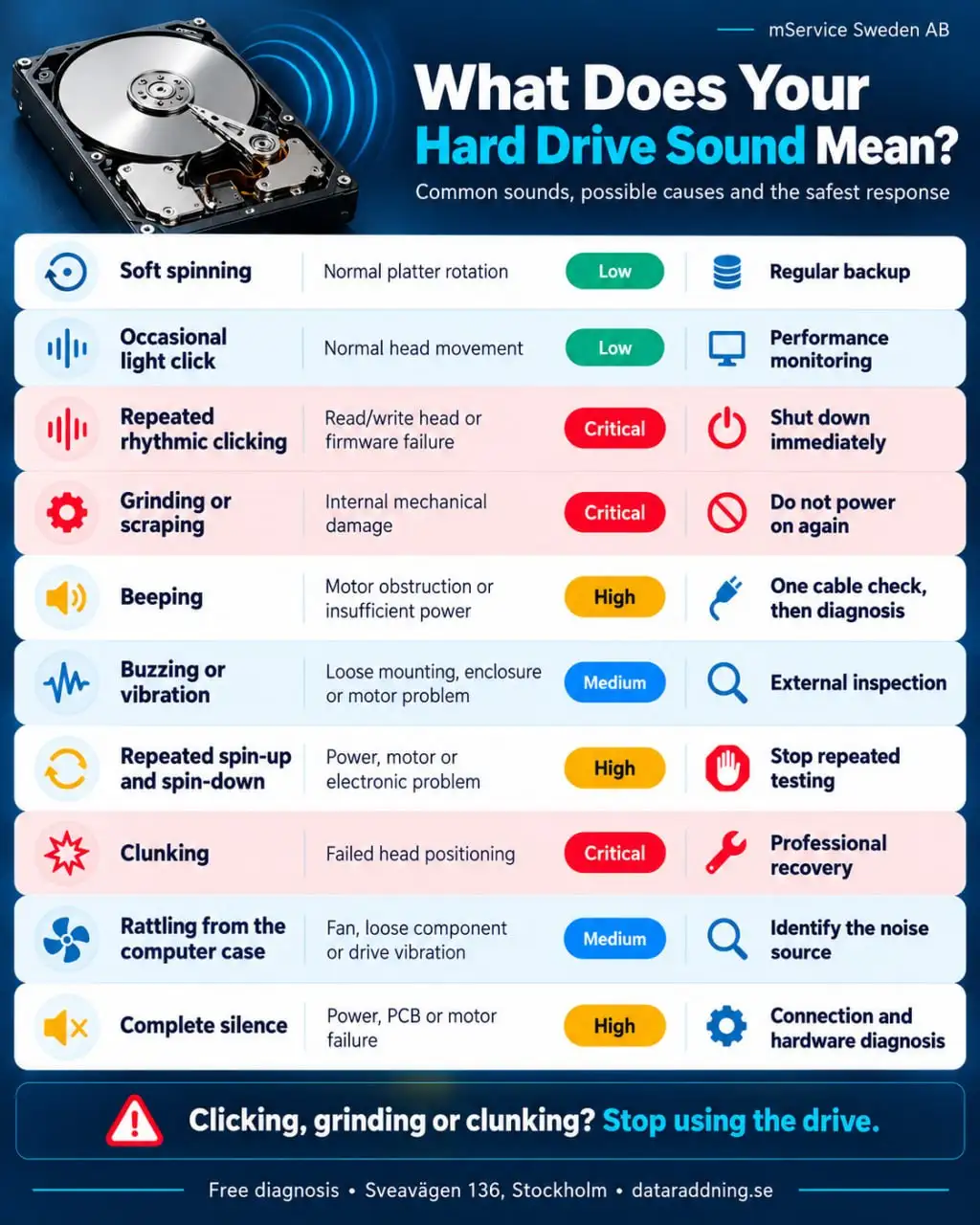
Seagate identifies persistent hard clicking, repeated clunking, and grinding as possible signs of a physical drive problem.
What Does a Bad HDD Sound Like?
A bad HDD commonly produces repetitive or harsh mechanical sounds that weren’t there before. The sound may continue while the computer freezes, struggles to start, or fails to recognize the drive.
The most concerning sounds include:
- Repeated clicking
- Metallic grinding
- Scraping
- Loud clunking
- Repeated beeping
- Unstable spin cycles
- Sudden harsh vibration
The pattern matters. One soft click during startup may be normal. A repeated click every few seconds, particularly with an undetected drive, often indicates that the heads cannot read the necessary information from the platters.
Why Is My Hard Drive Clicking?
A clicking hard drive is usually attempting to position or reset its read/write heads. If the heads cannot read the servo information used for navigation, the drive may reset and try again. Each reset produces another click.
Possible causes include:
- Damaged read/write heads
- Failed head preamplifier
- Corrupted firmware
- Damaged service area
- Platter-surface damage
- Physical impact
- Electronic malfunction
A repetitive clicking sound accompanied by detection failure usually indicates a physical problem. Data recovery software cannot repair damaged heads or internal mechanical components.
Reddit data-recovery discussions repeatedly describe the same combination: the drive clicks, disappears from BIOS or Windows, and the owner hopes recovery software will help. In this situation, software cannot communicate reliably with the damaged hardware.
Why Is My Hard Drive Making a Grinding or Scraping Noise?
Grinding or scraping is more serious than ordinary activity noise. It may indicate internal mechanical contact, damaged bearings, or unstable moving components.
Possible causes include:
- Head-to-platter contact
- Damaged spindle bearing
- Motor deterioration
- Loose internal component
- Severe impact damage
- Platter contamination
Continuing to operate it may scratch the platter surface. Once the magnetic layer containing the data is physically removed, recovery from the affected area may become impossible.
Do not run a SMART test, surface scan or recovery program on a grinding drive. Switch it off and keep it stationary.
Why Is My Hard Drive Beeping?
A mechanical hard disk doesn’t have a conventional speaker. The beeping sound usually comes from vibrations inside the drive.
Common causes include:
- Insufficient USB power
- Damaged USB cable
- Weak power adapter
- Obstructed spindle motor
- Stuck internal mechanism
- Impact-related damage
- External enclosure problem
A portable external hard drive may beep when it cannot draw enough power from a damaged port, cable, or unpowered USB hub.
One controlled test with a compatible cable and another direct USB port may help rule out a connection problem. If the drive continues beeping or remains undetected, disconnect it.
Why Is My Hard Drive Buzzing or Vibrating?
A low, consistent vibration can be normal for a mechanical hard disk. A new or unusually strong buzzing sound may come from the drive, its enclosure, or the computer case.
Possible causes include:
- Loose mounting screws
- Resonating metal case
- Damaged external enclosure
- Uneven operating surface
- Motor or bearing wear
- Power instability
- Internal mechanical resistance
Place an external drive on a stable, flat surface. Do not press, tap, or shake it while it is operating.
If the buzzing appears only during intensive file access and the drive works normally, the enclosure may be amplifying normal mechanical activity. If buzzing is combined with slow transfers, disconnections, or detection failures, it requires further diagnosis.
Why Does My Hard Drive Spin Up and Then Stop?
Repeated spin-up and spin-down cycles may indicate that the drive cannot complete its startup sequence.
Potential causes include:
- Unstable power supply
- Damaged power connector
- Failed motor
- Circuit-board problem
- Read/write head failure
- Firmware malfunction
- External enclosure fault
Connect an external drive directly to the computer using its original or correctly rated power adapter. If the problem continues, avoid repeated power cycles.
Can a Hard Disk Make Noise Without Being Damaged?
Yes. All mechanical hard disks produce some noise. The amount depends on the drive model, rotation speed, capacity, workload, enclosure, and mounting method.
Normal situations include:
- Initial startup
- Wake from sleep
- Heavy file transfer
- Backup operation
- Disk indexing
- Internal maintenance
- Head parking
A louder drive is not automatically damaged. Concern increases when the sound is new, repetitive or accompanied by file errors, freezing, and detection problems.
If you’re unsure, compare the current sound with the manufacturer’s documentation for that exact model. Don’t rely only on recordings of unrelated drives, because different HDD models can sound noticeably different during normal operation.
What Could Be Causing My Computer to Make Strange Noises?
The hard disk is not the only moving component inside a computer. Cooling fans, optical drives, and loose cables can produce sounds that are easy to mistake for HDD failure
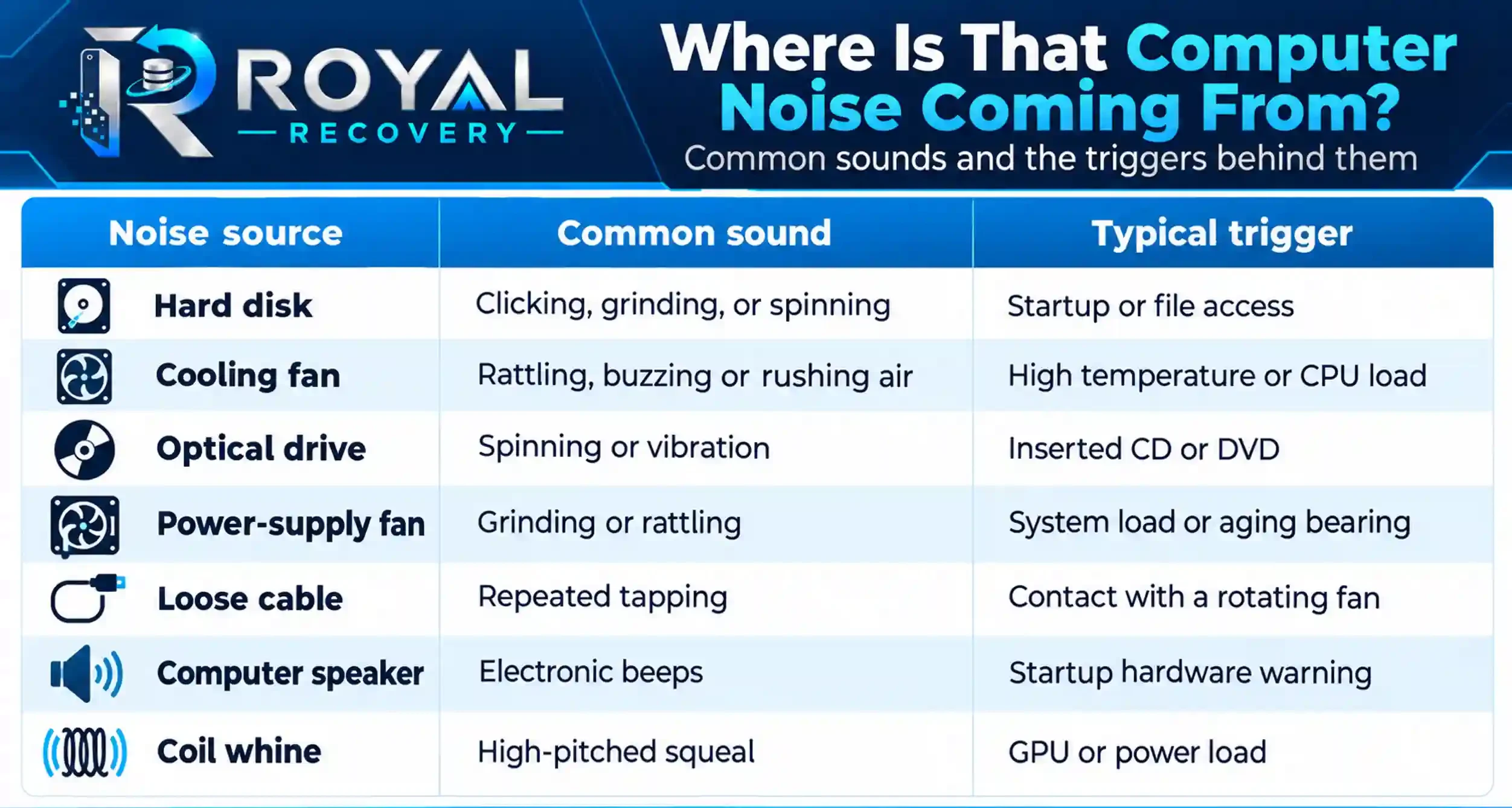
.A fan-related noise often changes with temperature and processor load. Hard disk noise commonly appears during startup, file transfers, or folder access.
Do not place metal tools inside a powered computer to locate a sound. Turn the computer off before inspecting cables, fans, or internal mounting points.
Can an SSD Make Clicking or Grinding Noises?
No. An SSD has no spinning platters, moving heads, or mechanical motor. It cannot produce genuine clicking or grinding through normal storage operation.
If a computer with only SSD storage makes a mechanical noise, the source may be:
- Cooling fan
- Power-supply fan
- Loose cable
- Optical drive
- External HDD
- Speaker warning
- Electrical coil whine
An SSD can still fail, but it normally does so silently. Warning signs may include read-only mode, corrupted files, frequent crashes, slow performance, or complete detection failure.
What Are the Signs of a Dying HDD?
Unusual noise is only one sign of a dying HDD. Other symptoms may appear before or alongside the sound.
Common warning signs include:
- Extremely slow file access
- Repeated system freezing
- Corrupted photographs or documents
- Missing folders
- Read and write errors
- Failed file transfers
- SMART warnings
- Intermittent drive detection
- Operating-system boot failure
- Automatic repair loops
- Unexpected computer restarts
- Burning smell
- Repeated clicking or grinding
A drive that makes unusual sounds but still works isn’t safe. It may only mean that the failure is incomplete.
Can You Test a Noisy Hard Drive?
Testing depends on the type of noise and the value of the stored data.
You can check a quiet, stable drive through its SMART status or the manufacturer’s short diagnostic test. Back up important files first.
Do not run diagnostic software when the drive has:
- Repeated clicking
- Grinding or scraping
- Drop-related noise
- Frequent disconnection
- Extremely slow response
- Critical unbacked-up data
Long scans force the drive to read large areas of its surface. That workload can worsen an existing head or platter problem.
What Should You Do When a Hard Drive Starts Making Noise?
Your response should depend on the sound.
Soft or familiar operating noise
Check the drive’s health, confirm the backup, and monitor any changes.
New buzzing or vibration
Check the external enclosure, operating surface, power adapter, and mounting. Avoid moving the drive while it is running.
Repeated clicking or clunking
Shut down the computer and disconnect the drive. Do not use recovery software or restart it repeatedly.
Grinding or scraping
Remove power immediately. Keep the drive flat and stationary until a professional assesses it.
Beeping external drive
Test with a compatible cable and a direct USB port. Disconnect the drive if the beeping continues.
Noise after a fall
Do not reconnect the drive. Impact damage can affect the heads, motor or platter surface even when no external damage is visible.
What Should You Never Do With a Noisy Hard Drive?
The internet contains plenty of hard-drive repair advice. Some of it is outdated; some of it is a fast track from “damaged” to “dead.”
Avoid the following:
- Repeated power connections
- Freezer treatment
- Physical tapping
- Drive shaking
- Home disassembly
- Random PCB replacement
- Formatting
- Operating-system reinstallation
- Repeated recovery scans
- Surface tests on clicking drives
- Data recovery onto the same drive
Never open a mechanical hard disk in an ordinary room. Dust contamination can damage the platter surface and complicate professional recovery.
Forum discussions consistently warn users to stop powering drives that begin clicking or grinding after a fall. Each additional spin-up may increase mechanical damage.
Hard Drive Making Unusual Noises? Get Professional Help
Clicking, grinding, or scraping sounds may indicate mechanical damage inside your hard drive. Continuing to use the drive can increase the risk of permanent data loss.
Our [Professional Hard Drive Repair Services] can help identify the cause of the problem and determine the safest solution for your device.
Contact mService Sweden AB for a professional assessment before attempting further repairs.
Can Data Be Recovered From a Noisy Hard Drive?
Data recovery may be possible, but the outcome depends on the type of damage and the condition of the platter surface.
Recoverable failure scenarios may include:
- Failed read/write heads
- Damaged circuit board
- Motor problems
- Corrupted firmware
- Bad sectors
- Unstable external enclosure
- Logical file-system damage
- Impact-related failure
Professional recovery may require stabilizing the drive, replacing donor components, cleanroom work, and controlled sector-by-sector imaging.
No responsible technician can guarantee complete recovery before examining the device. Severe platter scratches or overwritten data may make some files permanently unrecoverable.
When Should You Contact a Hard Disk Data Recovery Specialist in Stockholm?
Seek professional diagnosis when the drive contains valuable data and shows signs of physical failure.
Specialist assessment is particularly important after:
- Repeated clicking
- Grinding or scraping
- Drop or impact damage
- Fire or liquid exposure
- Complete detection failure
- Failed file transfers
- Severe bad sectors
- Burning smell
- Unsuccessful DIY recovery
- Critical business-data loss
Keep the hard disk switched off before assessment. A quiet drive on a laboratory bench has a better chance than one exhausted by fifty hopeful restarts.
Professional Hard Disk Diagnosis and Data Recovery in Stockholm
Don’t ignore unusual hard disk noise, especially if the drive also freezes, disappears, or prevents access to your files.
With more than 25 years of experience, PC-3000 technology, and cleanroom facilities, mService Sweden AB provides professional HDD diagnosis and data recovery for individuals, companies, and organizations in Stockholm and across Sweden.
If your hard drive has started clicking, grinding, buzzing, or beeping, disconnect it and contact us before trying another repair program. We can examine the HDD, identify the failure type, and determine the safest route to recover your files.
Frequently Asked Questions About Unusual Hard Disk Noises
The following questions reflect recurring concerns raised on Reddit and computer-support forums about clicking, grinding, beeping, and noisy external hard drives.
Why is my hard drive making a weird noise?
A hard drive may make unusual noise because of normal head movement, enclosure vibration, insufficient power, motor wear, or internal mechanical damage. A new repetitive clicking, grinding or scraping sound requires immediate attention.
What does a bad HDD sound like?
A bad HDD may produce repeated rhythmic clicking, harsh grinding, scraping, clunking, beeping or repeated spin-up sounds. The most serious warning is a new mechanical noise combined with freezing, corrupted files, or detection failure.
Is occasional clicking from a hard drive normal?
Occasional light clicks may be normal during startup, shutdown, wake-up, or head parking. Persistent hard clicking or a new repetitive pattern is more concerning, especially when the drive no longer works correctly.
Why does my external hard drive beep but not appear?
The drive may lack sufficient power, have a damaged USB cable, a failed enclosure,, or an internal mechanical problem. Try one compatible cable and a direct USB port. If the beeping continues, disconnect the drive.
Can a loose hard drive make a buzzing noise?
Yes. A loose mounting point or resonating enclosure can amplify normal vibration. However, strong buzzing with slow performance or repeated disconnection may indicate motor or power problems.
Why does my hard drive make noise only during file transfers?
Hard disks make more seek noise during intensive reading and writing. This can be normal. Concern increases when the noise is harsh, new, or accompanied by slow transfers, errors, and freezing.
My hard drive fell and now clicks. Can I test it again?
No. Clicking after a fall strongly suggests physical damage. Reconnecting the drive may allow damaged heads to scratch the platter surface.
Will recovery software fix a clicking hard drive?
No. Recovery software cannot repair damaged heads, a failed motor or scratched platters. It may help with deleted files or logical damage only when the hardware remains stable and accessible.
Can I record the hard drive noise for diagnosis?
A recording may help describe the symptom, but it cannot identify the precise internal failure. Different problems can create similar sounds, and different models produce different normal operating noises.
Should I run CHKDSK on a noisy hard drive?
Not when mechanical failure is suspected. CHKDSK modifies the file system and may place significant stress on the drive. Protecting the data comes before repairing the file system.
Can a noisy hard drive continue working for years?
Possibly, if the sound is part of its normal operation. A new or changing noise is different. No test can guarantee how long a mechanically unstable drive will continue working.
Why does the hard drive click and then stop spinning?
The drive may be unable to complete its startup sequence because of problems with the head, motor, firmware, electronics, or power. Repeated power cycles should be avoided.
Does replacing the USB cable fix a noisy external hard drive?
It may solve beeping or unstable operation caused by insufficient power or a damaged connection. It will not repair clicking, grinding, or internal mechanical damage.
Should I replace a hard drive that has started making new noises?
Yes, after you’ve safely backed up or recovered the data. A drive with changing mechanical sounds shouldn’t be the only place where you store valuable files.