
A slow laptop does not always need replacing. Often, the real problem is a full storage drive, too many startup programs, insufficient RAM, overheating, or an aging mechanical hard drive. However, sudden performance loss combined with freezing, corrupted files, or unusual noises can indicate something more serious: storage failure and possible data loss.
Start with one important question: has the laptop gradually become slower, or did the problem appear suddenly? Gradual slowdown usually points towards limited hardware, accumulated software or poor maintenance. A sudden slowdown requires more caution, especially if the laptop contains important files.
If the laptop freezes during file access, produces clicking noises, or repeatedly loses access to its storage drive, back up accessible files and avoid unnecessary testing. A slow laptop is annoying. A failing drive holding the only copy of your files is a different story entirely.
What Are the Main Reasons for a Laptop Slowing Down?
The most common reasons for a laptop slowing down include:
- Excessive startup programs
- Insufficient RAM
- Nearly full storage
- Aging mechanical hard drive
- Failing HDD or SSD
- Malware or unwanted software
- Background system updates
- Excessive browser tabs
- Dust and blocked ventilation
- CPU or GPU overheating
- Outdated operating system
- Outdated hardware drivers
- Power-management restrictions
- Low-performance processor
- Aging laptop components
Multiple problems may exist at the same time. For example, an older laptop may have limited RAM, an aging hard drive, and a dust-clogged cooling system. Fixing only one issue may improve performance without completely solving the problem.
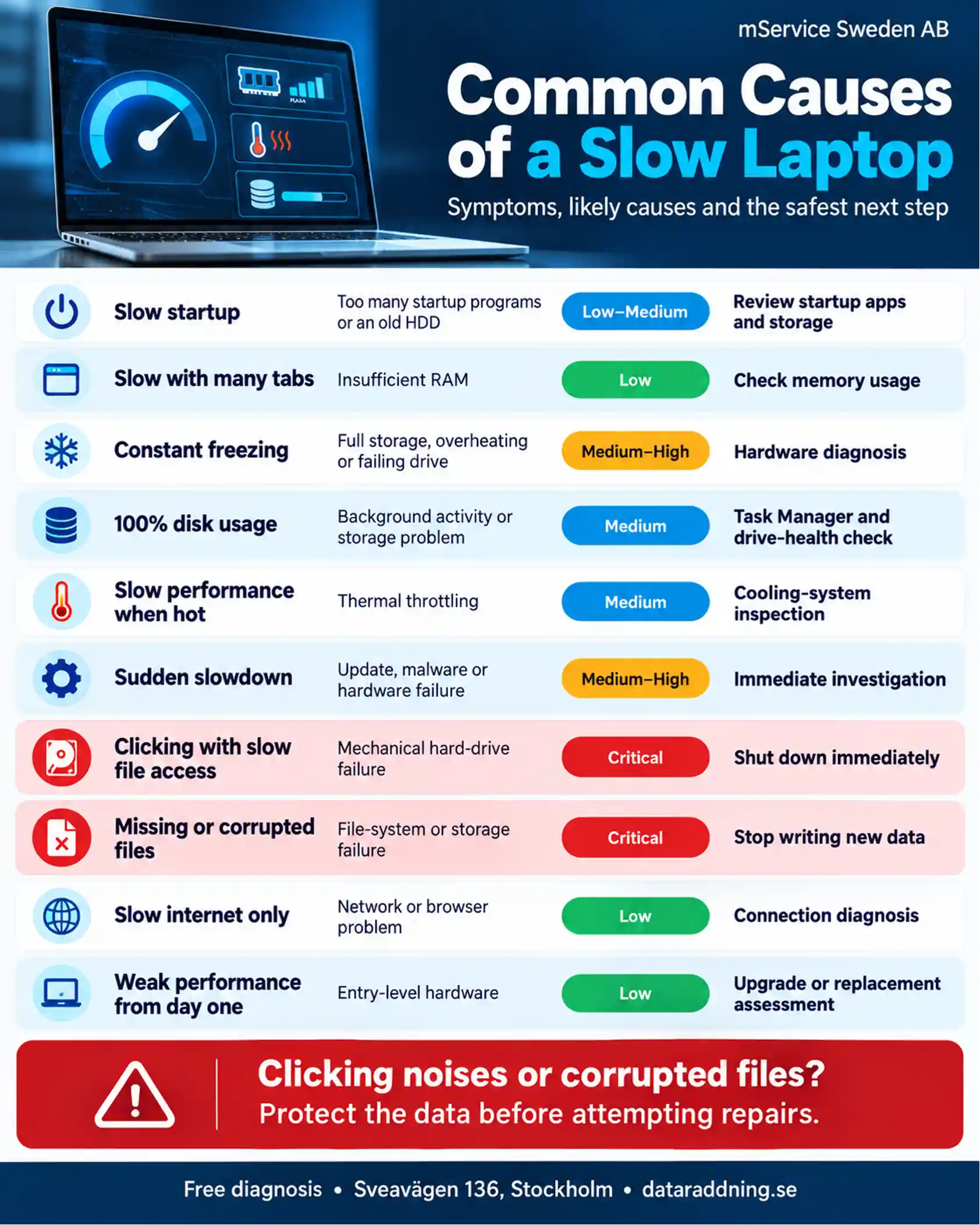
Common Causes of a Slow Laptop
Why Is My Laptop Suddenly Running So Slowly?
A laptop that slows down overnight needs a different approach than one that has gradually lost performance over several years.
Sudden slowdown may result from:
- Background Windows update
- Antivirus scan
- New software installation
- Malware infection
- Full storage drive
- Driver conflict
- Failed system update
- Overheating
- Battery or charger problem
- Developing storage failure
Open Task Manager on Windows or Activity Monitor on macOS and check whether the processor, memory, or storage usage remains unusually high.
A temporary spike during an update may be normal. Constant 100% disk usage, repeated freezing, and extremely slow file access require closer investigation. Forum users regularly report sudden slowdowns caused by background updates, malware, heat, or abnormal disk activity, not a single universal problem.
How Can You Identify What Is Slowing Down Your Laptop?
Start by noticing when the laptop slows down.
Slow performance during startup points towards startup programs, storage speed or operating-system problems. Slow performance with several applications open often indicates insufficient memory. Performance loss after several minutes of use may point towards overheating.
On a Windows laptop, open Task Manager and check the following sections:
- CPU usage
- Memory usage
- Disk usage
- Startup applications
- Background processes
- GPU usage
On a MacBook, open Activity Monitor and review:
- CPU pressure
- Memory pressure
- Disk activity
- Energy usage
- Unresponsive applications
Don’t judge performance by one brief spike. Look for a component that stays near maximum usage during normal tasks.
Can a Full Hard Drive Make a Laptop Slow?
Yes. A nearly full HDD or SSD can slow a laptop because the operating system needs free space for temporary files, updates, caching, and virtual memory.
Common signs of insufficient storage include:
- Slow system updates
- Failed software installation
- Long application loading
- Browser instability
- Low-storage warnings
- Reduced SSD performance
- Limited virtual memory
Start by removing unnecessary downloads, temporary files, unused programs and duplicate media. Move large photographs and videos to another properly backed-up storage device.
Do not delete unfamiliar system folders. A storage-cleaning marathon with no idea what you are deleting is an excellent way to exchange a slow laptop for a broken one.
Can a Failing Hard Drive Cause Slow Laptop Performance?
Yes. A failing hard drive can make the entire laptop extremely slow.
When a drive develops bad sectors or mechanical problems, it may repeatedly attempt to read the same information. The operating system waits for the drive, causing frozen folders, delayed startup and unresponsive applications.
Warning signs include:
- Clicking or grinding noises
- Slow file transfers
- Repeated transfer errors
- Missing or corrupted files
- Intermittent drive detection
- SMART health warnings
- Startup repair loops
- Frequent system crashes
A failing storage drive requires more than a performance tune-up. If the data matters, minimize further use and protect the files before attempting repairs.
How Can You Tell the Difference Between a Slow Laptop and a Failing Hard Drive?
A generally slow laptop may still operate consistently. A laptop with a failing drive often behaves unpredictably, especially during startup or when accessing files.
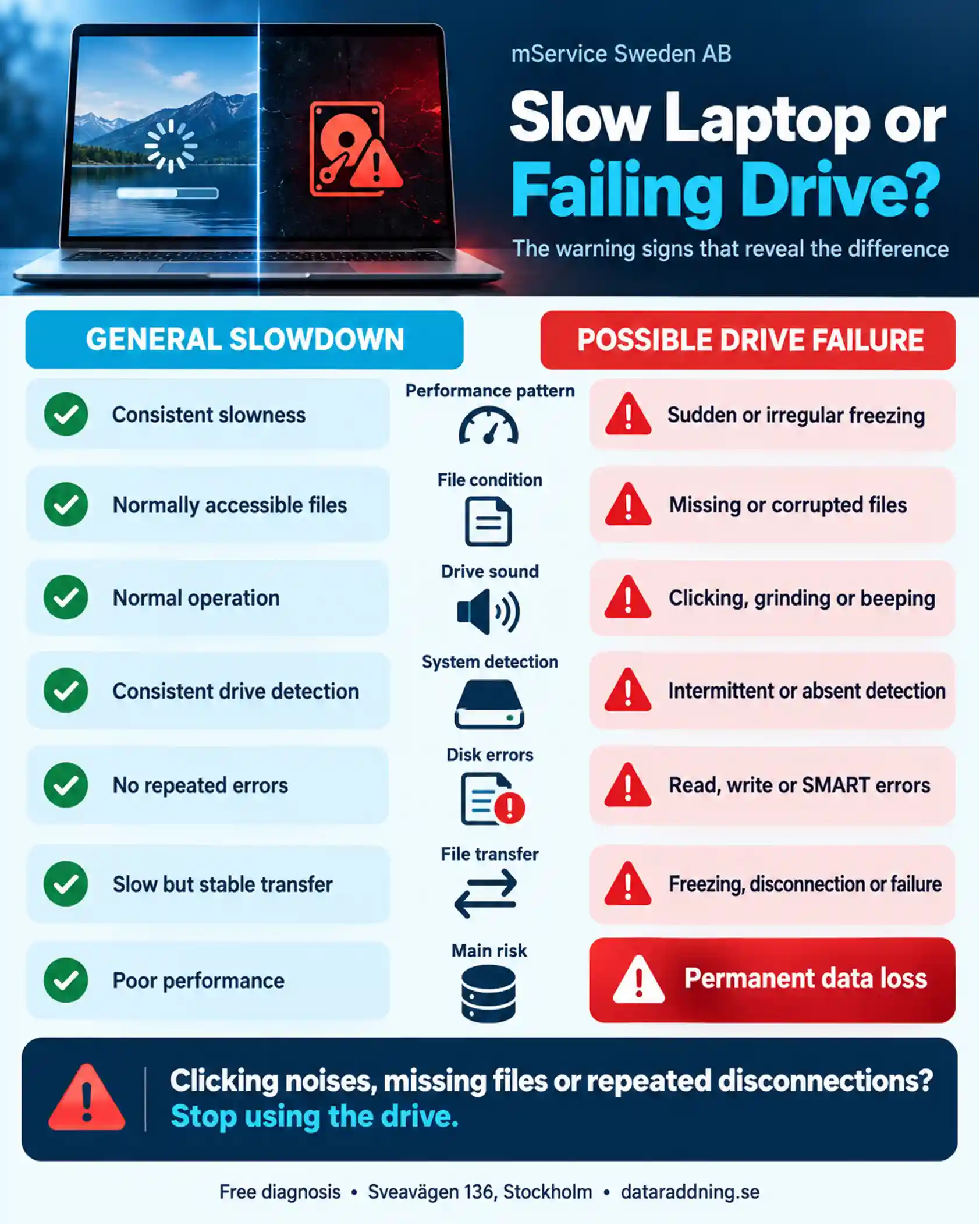
A mechanical noise is especially important. Software problems don’t make a hard drive click or grind.
Do Too Many Background Programs Slow Down a Laptop?
Yes. Applications that start automatically can consume processor power, memory and storage activity before you begin working.
Common background resource users include:
- Cloud synchronisation tools
- Messaging applications
- Game launchers
- Manufacturer utilities
- Automatic update services
- Third-party antivirus software
- Browser extensions
- Unused creative applications
Review the Startup Apps section in Windows Task Manager or Login Items in macOS settings. Disable only programs you recognize and do not need immediately after startup.
Disabling an unnecessary startup program usually doesn’t uninstall it. The application remains available whenever you choose to open it.
Can Low RAM Make a Laptop Run Slowly?
Yes. RAM stores information that active programs need immediately. When available memory becomes insufficient, the operating system moves some information between RAM and the storage drive. This process is much slower, especially on laptops with traditional mechanical hard drives.
Signs of insufficient RAM include:
- Slow application switching
- Frozen browser tabs
- Application reloads
- High memory usage
- Poor multitasking
- Heavy storage activity
- Browser crashes
More RAM helps when memory is the actual bottleneck. It will not solve a weak processor, failing storage drive, or severe overheating.
Before purchasing memory, confirm the laptop’s maximum supported capacity, memory type, and available upgrade slots. Many thin laptops have soldered RAM with no upgrade option.
Can Malware or a Virus Slow Down a Laptop?
Yes. Malware can use processor power, memory, storage, and internet bandwidth in the background.
Possible warning signs include:
- Unfamiliar applications
- Unexpected browser redirects
- Persistent pop-ups
- High background activity
- Disabled security software
- Unknown startup programs
- Rapid battery drain
- Unexplained network traffic
Run a full scan using a trusted security tool. Avoid installing multiple antivirus programs at once, because competing real-time scanners can create additional performance problems.
Malware is one possible cause of slow performance, but it’s not the automatic explanation for every tired laptop.
Can Overheating Reduce Laptop Performance?
Yes. Modern processors reduce their operating speed when temperatures become too high. This protective process is called thermal throttling.
The laptop may start normally and then slow down after several minutes. Fans may run continuously, the keyboard may feel unusually hot, and performance may improve after the laptop cools down.
Common causes of overheating include:
- Blocked air vents
- Dust-filled cooling fan
- Dried thermal compound
- Damaged cooling fan
- Soft operating surface
- High room temperature
- Heavy processor workload
- Poor internal airflow
Avoid using the laptop on a bed, blanket, or sofa because soft materials can block its ventilation openings. Persistent overheating may require internal cleaning and cooling-system maintenance. Technical forum discussions also regularly identify thermal throttling when a laptop remains slow even after an SSD or RAM upgrade.
Why Do Laptops Get Slower After a Few Years?
The processor does not normally wake up on its fifth birthday and decide to become lazy. What changes is the workload around it.
Over time, the laptop may accumulate more applications, background services, browser extensions and temporary files. New versions of Windows, macOS and everyday software may also require more memory and processing power than the original versions.
Age-related causes include:
- Increasing software requirements
- Additional background services
- Reduced free storage
- Dust accumulation
- Aging thermal compound
- Battery deterioration
- Hard-drive wear
- Storage degradation
- Outdated drivers
- Limited original hardware
An entry-level laptop may feel fast when new because very little software is installed. After several years, even modest background activity can overwhelm a low-power processor. Forum discussions about older laptops repeatedly raise the same dilemma: RAM and SSD upgrades can help, but neither can transform a weak processor into a powerful one.
How Do You Fix a Slow Laptop?
Start with the simplest and safest checks.
Restart the laptop
A proper restart clears temporary processes and completes pending system tasks. Constant sleep mode can let minor software problems build up.
Review startup programs
Disable unnecessary startup applications through Task Manager or macOS Login Items. Keep security, touchpad, and essential hardware utilities enabled.
Free storage space
Remove unnecessary downloads, temporary files, and unused programs. Maintain enough free space for system updates and temporary operations.
Check resource usage
Review CPU, memory, and disk activity while the laptop feels slow. The component that remains heavily used often points to the cause.
Install system updates
Install trusted operating-system and driver updates. A failed or incomplete update may cause performance problems, but constant background updates may also temporarily slow the laptop.
Run a malware scan
Use a reputable security tool and remove suspicious programs or browser extensions.
Check the temperature
Persistent heat, loud fans, and reduced performance after several minutes may indicate thermal throttling.
Test storage health
Review the SMART status of the HDD or SSD. Back up important files before running intensive storage tests.
Consider a hardware upgrade
An SSD upgrade can make a major difference to a laptop still using a mechanical hard drive. Additional RAM may improve multitasking when memory usage is consistently high.
Forum users often recommend an SSD as the most noticeable upgrade for an older HDD-based laptop, followed by additional RAM when memory is the bottleneck.
How Can You Make an Old Laptop Run Faster?
An old laptop may remain useful when its processor is still adequate, and its main limitations are storage or memory.
The most effective improvements usually include:
- HDD-to-SSD replacement
- Compatible RAM upgrade
- Internal cooling-system cleaning
- Unnecessary software removal
- Startup-program reduction
- Fresh operating-system installation
- Battery and charger assessment
- Current hardware drivers
- Adequate free storage
Back up important files before replacing the storage drive or reinstalling the operating system.
An SSD will improve startup time, application loading, and file access. It will not significantly improve processor-heavy tasks when the CPU itself is the main limitation.
How Can You Prevent a Laptop From Getting Slow?
Regular maintenance prevents small problems from quietly building into serious performance loss.
Useful preventive measures include:
- Regular system updates
- Controlled startup applications
- Adequate free storage
- Routine malware scans
- Clear ventilation openings
- Hard and stable operating surface
- Regular data backups
- Periodic storage-health checks
- Careful software installation
- Responsible browser-tab use
- Professional internal cleaning
- Early battery and charger diagnosis
Keep at least one current backup outside the laptop. Performance problems can sometimes be repaired; overwritten or mechanically damaged data may be far less forgiving.
When Should You Repair, Upgrade or Replace a Slow Laptop?
The right choice depends on the laptop’s age, specifications, physical condition, and intended use.
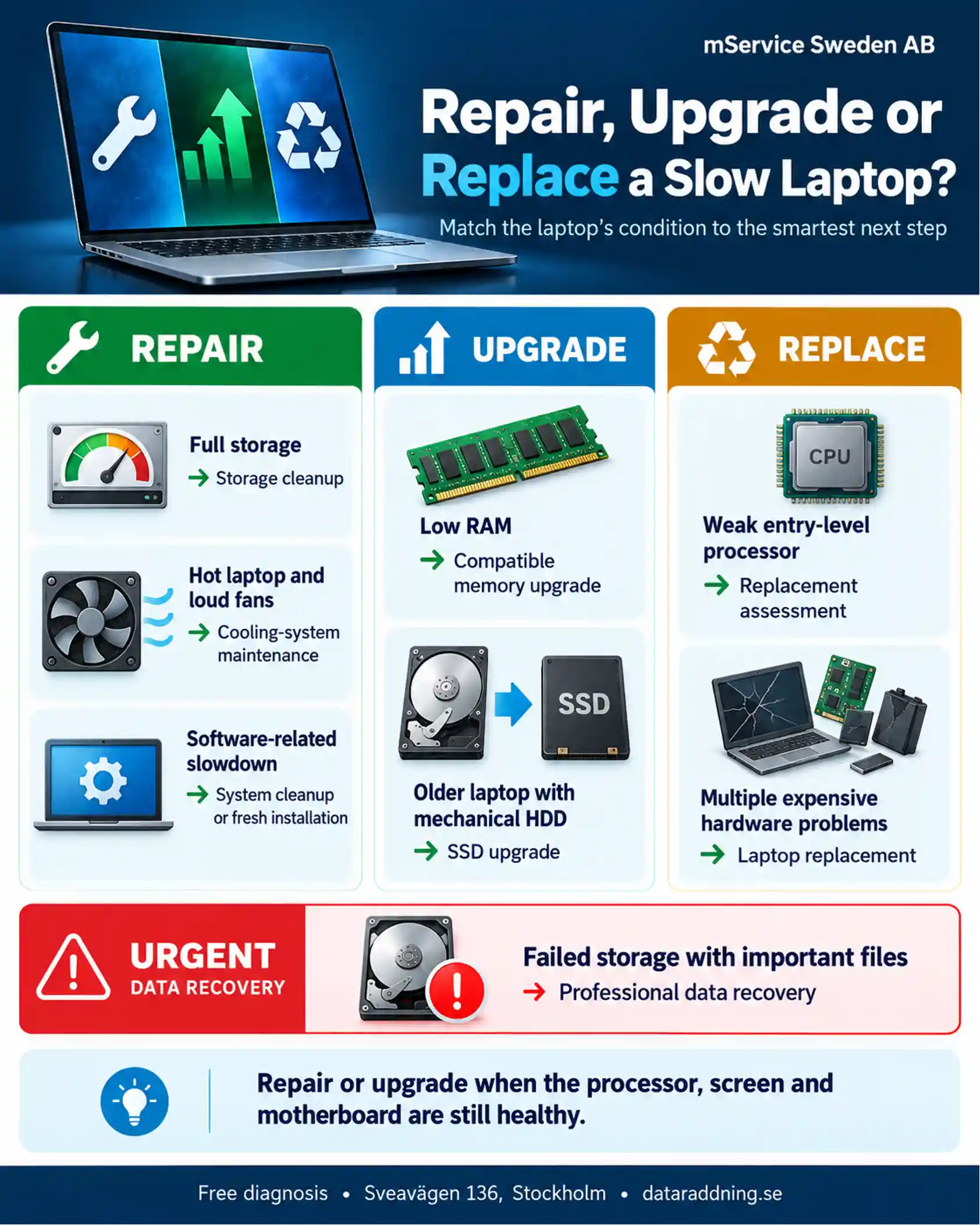
Repair or upgrade makes sense when the laptop has a suitable processor, good screen, working motherboard and replaceable components.
Replacement is often more sensible when the laptop has a weak processor, soldered low-capacity memory, damaged hinges, poor battery health and other expensive problems at the same time.
What Is the Average Lifespan of a Laptop?
A laptop typically remains useful for about four to six years, though premium business laptops may last longer with proper maintenance and appropriate upgrades.
Its practical lifespan depends on:
- Build quality
- Processor capability
- Memory capacity
- Storage condition
- Battery health
- Cooling performance
- Daily workload
- Physical care
- Software support
- Repair availability
A laptop doesn’t become unusable just because it reaches a certain age. A seven-year-old business laptop with an SSD and enough RAM may still suit office work. A newer entry-level laptop with a weak processor may struggle much sooner.
When Does a Slow Laptop Put Your Data at Risk?
Slow performance becomes a data-risk warning when it appears alongside storage-related symptoms.
Serious warning signs include:
- Clicking or grinding noises
- Corrupted personal files
- Repeated read errors
- Failed file transfers
- Intermittent storage detection
- SMART health warnings
- Automatic disk-repair loops
- Operating-system boot failure
- Sudden storage disappearance
- Repeated laptop freezing during file access
If the storage drive remains quiet and accessible, copy the most valuable files first. Do not start with a full system backup if the drive freezes during normal file access.
If the drive clicks, disappears or prevents the laptop from starting, switch off the laptop. Repeated scans and restarts can increase the damage.
When Should You Contact a Laptop and Data Recovery Specialist in Stockholm?
Seek professional diagnosis when the laptop contains valuable files and shows signs of physical, electrical, or storage failure.
Specialist assessment is particularly important after:
- Laptop impact or fall
- Liquid exposure
- Burning smell
- Clicking storage drive
- Complete boot failure
- Undetected HDD or SSD
- Corrupted business files
- Unsuccessful recovery attempts
- Severe overheating
- Repeated storage disconnection
A general performance problem may only need maintenance or an upgrade. A failed storage device requires a data-first approach. Protecting the files comes before repairing or reinstalling the laptop.
Professional Laptop Diagnosis and Data Recovery in Stockholm and Across Sweden
A slow laptop may need only storage cleanup, more memory, or cooling-system maintenance. But when the slowdown is accompanied by corrupted files, unusual drive noises, or startup failure, continued use can put your data at risk.
With more than 25 years of professional experience, specialist PC-3000 equipment, and cleanroom facilities, mService Sweden AB provides professional data recovery for laptops, hard drives, and SSDs in Stockholm and throughout Sweden.
If your files matter, do not let trial-and-error troubleshooting become the final cause of data loss. Stop using the laptop and request a professional assessment before the storage damage worsens.
Frequently Asked Questions About Slow Laptops
Why is my laptop slow even when no programs are open?
Background programs, Windows updates, antivirus scans, cloud synchronization, and system services may still use resources. Check Task Manager or Activity Monitor for high CPU, memory, or disk activity.
Persistent slowdown with low reported usage may indicate overheating, power-management restrictions, driver problems, or storage failure.
Why does Task Manager show 100% disk usage?
High disk usage may result from an update, antivirus scan, indexing service, cloud synchronization, or insufficient RAM. On a laptop with an aging HDD, constant 100% disk usage may also indicate poor drive performance or developing failure.
Check which process is using the disk before disabling services at random.
Why is my laptop fast after restarting but slow again later?
A restart temporarily clears background processes and frees up memory. If performance gradually declines again, the likely causes include a memory leak, overheating, excessive background activity, or an application that starts after login.
Will adding more RAM make my laptop faster?
More RAM helps when the laptop regularly runs out of available memory. It improves multitasking and reduces dependence on virtual memory.
It will not fix a failing drive, a weak processor, a malware infection, or overheating.
Should I upgrade the RAM or install an SSD first?
Choose the upgrade based on the bottleneck. For a laptop with a mechanical hard drive, an SSD normally provides the most noticeable improvement in startup and application-loading speed. If your laptop already has an SSD but constantly uses nearly all available memory, more RAM may be more valuable.
Why is my laptop still slow after installing an SSD?
An SSD cannot solve every performance problem. The remaining bottleneck may be insufficient RAM, a weak processor, overheating, power settings, incorrect drivers, or background software.
Forum users regularly report persistent slowdowns after SSD upgrades when heat or another component remains the real bottleneck.
Can too many browser tabs slow down a laptop?
Yes. Each browser tab may use memory and processor resources. Video, advertising, cloud applications, and browser extensions increase the load further.
High memory usage can force the laptop to rely on slower virtual memory stored on the drive.
Why is my laptop slow only when using the internet?
The problem may be the internet connection rather than the laptop. Possible causes include poor Wi-Fi signal, browser extensions, overloaded websites, background downloads or outdated network drivers.
Test an offline application or local file. Normal offline performance points more strongly towards a network or browser problem.
Why does my laptop become slow when it gets hot?
The processor slows down to protect itself from excessive heat. This thermal throttling can cause sudden performance loss during gaming, video editing or other demanding tasks.
Blocked vents, accumulated dust, and a damaged fan are common causes.
Is it safe to use a laptop on a bed?
No. Bedding can block ventilation openings and trap heat. Use the laptop on a hard, flat surface with clear airflow around the vents.
Can an old battery make a laptop slow?
Yes, in some cases. A damaged battery, unsuitable charger or restricted power setting may prevent the processor from reaching its normal performance level. Compare performance while using the correct charger and review the laptop’s power mode.
Is a slow laptop a sign of hard-drive failure?
Not always. Slow performance has many possible causes. Concern increases when the slowdown appears with clicking noises, corrupted files, transfer errors, SMART warnings or intermittent drive detection.
Should I reinstall Windows to fix a slow laptop?
A clean installation can fix accumulated software problems, but it shouldn’t be the first step when storage failure is suspected. Back up important files before reinstalling the operating system because installation can overwrite recoverable data.
Can a seven-year-old laptop still be upgraded?
Possibly. An SSD, additional RAM, and cooling-system maintenance may extend its useful life. The upgrade is less worthwhile when the processor is extremely weak, memory is soldered, software support has ended, or several components already require repair.
How often should you clean a laptop internally?
The correct interval depends on the environment and daily use. A laptop used around dust, smoke, or pet hair may need more frequent cleaning. Persistent heat, loud fans, and reduced performance are stronger indicators than a fixed calendar date.
When should I stop troubleshooting a slow laptop myself?
Stop when the laptop produces clicking noises, loses access to its storage drive, corrupts files, smells burned or contains irreplaceable data. At that point, continued testing can create a larger recovery problem.